Curve tool
 Version 1.0.5
The curve tool interpolates values between two user-defined points according to different curve functions. This eliminates the need for additional side calculations or manual estimations of values to construct a curve, and enables users to apply often-discussed business principles (e.g., S-shaped technology adoption curve) that can be quite complex to calculate to everyday modeling.
 Version 1.0.5
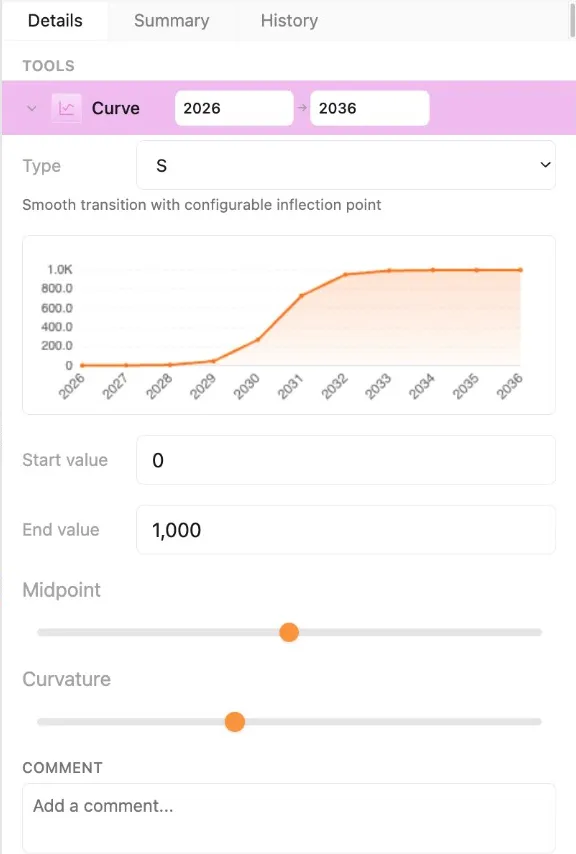
Type dropdown determines the function used to connect the starting and ending values. It includes four options, each calculated using an equation or system of equations detailed below.
Tool chart plots the shape of the curve created by the tool.
Start and End values are the endpoints of the curve and appear in the first and last cell covered by the tool. These values are used in the formulae below to calculate all values of the curve. Like the input tool, these values are scaled according to the row’s unit.
Sliders for midpoint and curvature factors allow the user to adjust the selected curve function and appearance depending on the curve type selected, thus enabling flexibility for the user to best reflect intended business dynamics in the model. The sliders change the shape of the curve, which updates in real-time in the tool chart.
Note: See Applying tools for an explanation of how tools are used in Parfera.
Equations
Section titled “Equations”| Type | Equation(s) |
|---|---|
| S-curve | |
| Exponential | |
| Logarithmic | |
| Linear |