Ribbon
The ribbon provides access to file controls, tools, and formatting. Open files are displayed as tabs at the top of the screen, thus allowing easy switching between files within the same window.
 Version 1.1.0
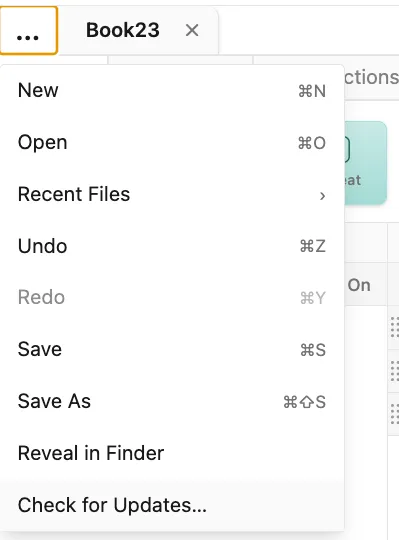
File controls, such as open, new, and save as, are accessed via the three-dot menu in the ribbon.
 Version 1.1.0
Keyboard access chains
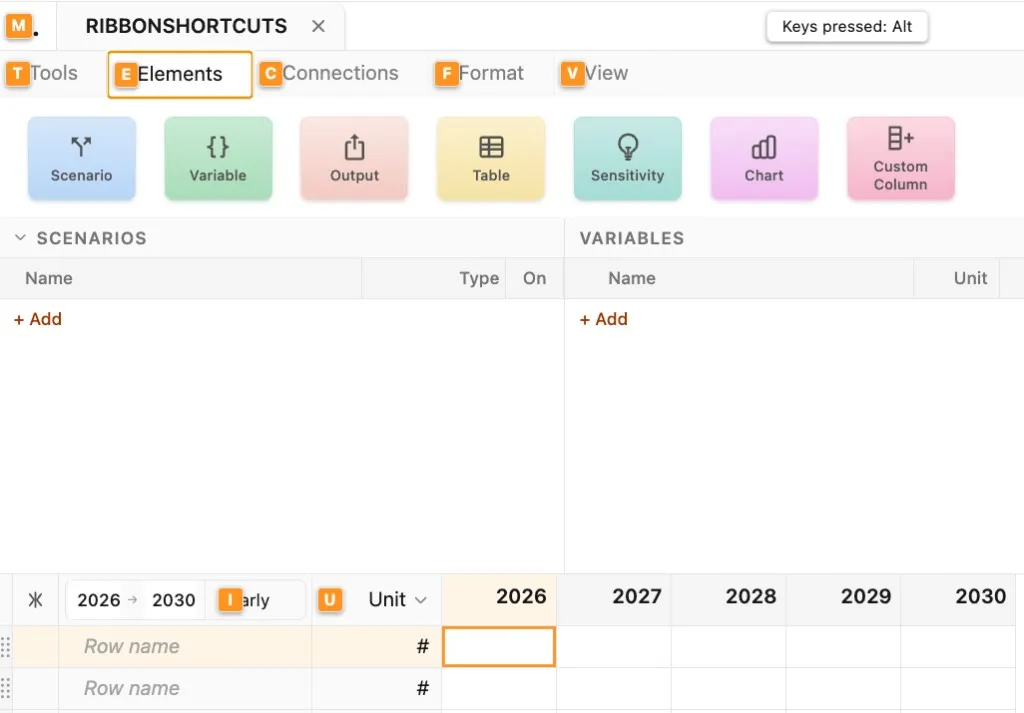
Section titled “Keyboard access chains”Press the Alt or ⌥ key to display ribbon access keys, shown as letters next to their respective tabs and options. Press the key that corresponds with letter shown next to a tab or option to select it. Chains of access keys allow full access to the options within Parfera without requiring use of the mouse.
 Version 1.0.16
| Action | Windows | macOS |
|---|---|---|
| Tools tab | Alt, T | ⌥, T |
| Input tool | Alt, T, I | ⌥, T, I |
| Formula tool | Alt, T, F | ⌥, T, F |
| Repeat tool | Alt, T, R | ⌥, T, R |
| Statistics tool | Alt, T, S | ⌥, T, S |
| Sum tool | Alt, T, U | ⌥, T, U |
| CAGR tool | Alt, T, A | ⌥, T, A |
| Growth rate tool | Alt, T, G | ⌥, T, G |
| Curve tool | Alt, T, C | ⌥, T, C |
| Elements tab | Alt, E | ⌥, E |
| Scenario | Alt, E, S | ⌥, E, S |
| Variable | Alt, E, V | ⌥, E, V |
| Output | Alt, E, O | ⌥, E, O |
| Table | Alt, E, T | ⌥, E, T |
| Sensitivity | Alt, E, E | ⌥, E, E |
| Chart | Alt, E, C | ⌥, E, C |
| Custom column | Alt, E, U | ⌥, E, U |
| Connections tab | Alt, C | ⌥, C |
| Import | Alt, C, I | ⌥, C, I |
| Export | Alt, C, E | ⌥, C, E |
| Format tab | Alt, F | ⌥, F |
| Negatives styling | Alt, F, N | ⌥, F, N |
| Show thousands separator | Alt, F, T | ⌥, F, T |
| Decimals | Alt, F, D | ⌥, F, D |
| Decimals reset | Alt, F, R | ⌥, F, R |
| View tab | Alt, V | ⌥, V |
| Set row height | Alt, V, H | ⌥, V, H |
| Set column width | Alt, V, W | ⌥, V, W |
| Set custom column width | Alt, V, C | ⌥, V, C |
| Toggle gridlines | Alt, V, G | ⌥, V, G |
| Toggle tool highlighting | Alt, V, T | ⌥, V, T |
| Toggle dark mode | Alt, V, D | ⌥, V, D |
| Sheet interval | Alt, I | ⌥, I |
| Unit/data type column | Alt, U | ⌥, U |
| Three dot menu | Alt, M | ⌥, M |
Keyboard shortcuts
Section titled “Keyboard shortcuts”| Action | Windows | macOS |
|---|---|---|
| New file | Ctrl + N | ⌘ + N |
| Open file | Ctrl + O | ⌘ + O |
| Undo | Ctrl + Z | ⌘ + Z |
| Redo | Ctrl + Y | ⌘ + Shift + Z |
| Save | Ctrl + S | ⌘ + S |
| Save As | Ctrl + Shift + S | ⌘ + ⌥ + S |
| Export | Ctrl + E | ⌘ + E |