Statistics tool
 Version 1.0.5
The statistics tool calculates average, median, mode, minimum, or maximum for a range of cells.
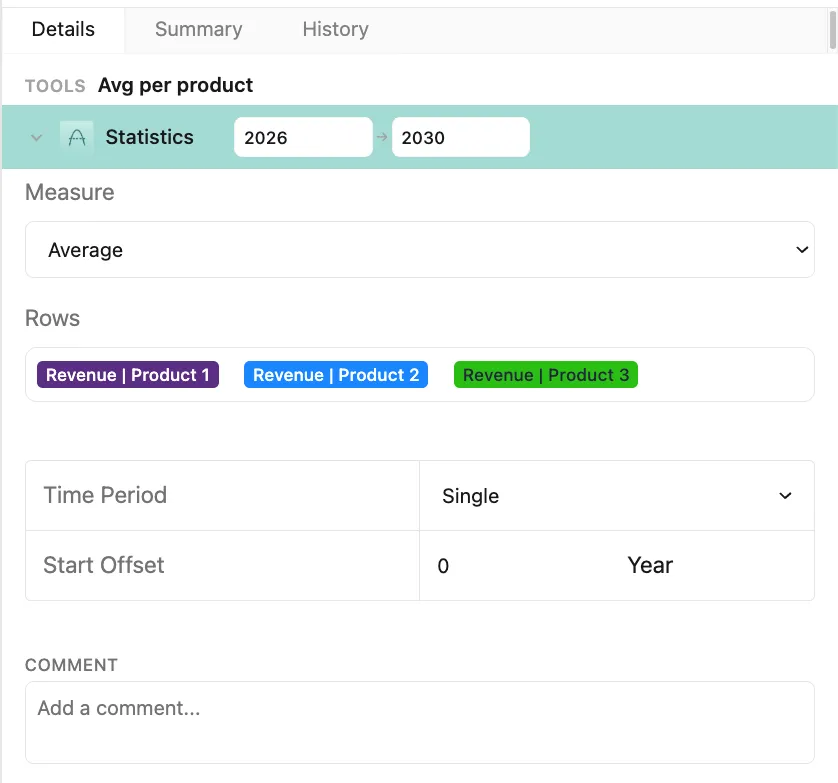 Version 1.0.6
The measure selected in the dropdown sets the calculation that will be applied to the rows and time period selected below. The statistics tool includes five options:
- Average (mean)
- Median
- Mode
- Minimum
- Maximum
Rows, selected via a derivative of the Formula box, are included in the calculation.
Time period determines the column(s) included in the calculation. Two options are provided:
Single includes data from a single column as defined by a single offset from the current column
Range includes data from multiple consecutive columns defined by a starting and ending offset from the current column
Note: Offsets specify a left/right shift in the grid relative to the user’s current year/column, allowing the tool to reference values from a different time period when calculating a cell’s value (e.g., a -1 year offset results in a 2026 formula being calculated with a 2025 value).
Note: See Applying tools for an explanation of how tools are used in Parfera.